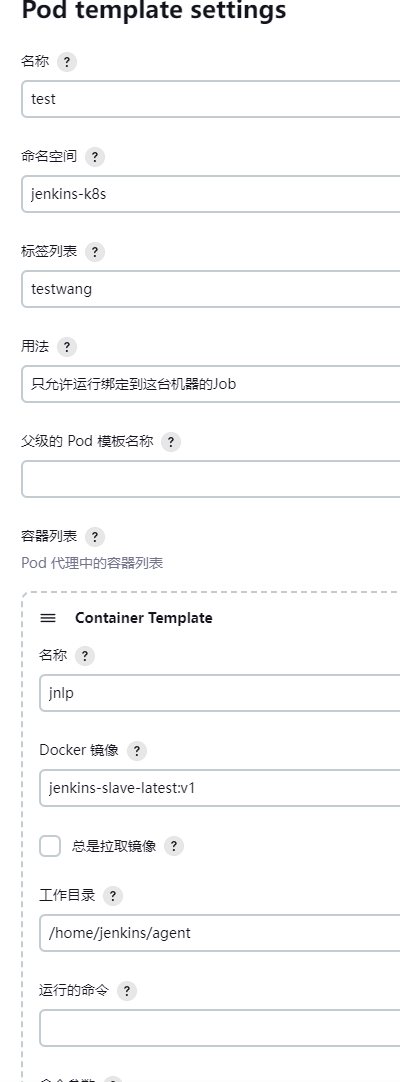
Jenkins setup:
Jenkins runs in Kubernetes 1.24.1
Jenkins version 2.453
I use the following yaml file to set up jenkins controller in k8s:
apiVersion: apps/v1
kind: Deployment
metadata:
  labels:
    app: jenkins
  name: jenkins
  namespace: jenkins-k8s
spec:
  replicas: 1
  selector:
    matchLabels:
      app: jenkins
  template:
    metadata:
      labels:
        app: jenkins
    spec:
      serviceAccountName: jenkins-k8s
      containers:
        - name: jenkins
          image: 'jenkins/jenkins:2.453'
          securityContext:
            privileged: true
            runAsUser: 0
          ports:
            - containerPort: 8080
              name: http
              protocol: TCP
            - containerPort: 50000
              name: jnlp
              protocol: TCP
          resources:
            limits:
              cpu: '2'
              memory: 4Gi
            requests:
              cpu: '1'
              memory: 4Gi
          env:
            - name: LIMITS_MEMORY
              valueFrom:
                resourceFieldRef:
                  divisor: 1Mi
                  resource: limits.memory
            - name: JAVA_OPTS
              value: >-
                -Xmx$(LIMITS_MEMORY)m -XshowSettings:vm
                -Dhudson.slaves.NodeProvisioner.initialDelay=0
                -Dhudson.slaves.NodeProvisioner.MARGIN=50
                -Dhudson.slaves.NodeProvisioner.MARGIN0=0.85
                -Duser.timezone=Asia/Shanghai
                -Dorg.apache.commons.jelly.tags.fmt.timeZone=Asia/Shanghai
            - name: JENKINS_OPTS    #设置路径前缀加上 Jenkins
              value: '--prefix=/jenkins'
            - name: JENKINS_JAVA_OPTIONS
              value: '-Dorg.apache.commons.jelly.tags.fmt.timeZone=Asia/Shanghai'
            - name: JAVA_ARGS
              value: >-
                -Xmx$(LIMITS_MEMORY)m -XshowSettings:vm
                -Dhudson.slaves.NodeProvisioner.initialDelay=0
                -Dhudson.slaves.NodeProvisioner.MARGIN=50
                -Dhudson.slaves.NodeProvisioner.MARGIN0=0.85
                -Duser.timezone=Asia/Shanghai
                -Dorg.apache.commons.jelly.tags.fmt.timeZone=Asia/Shanghai
            - name: JENKINS_JAVA_OPTIONS
              value: >-
                -Xmx$(LIMITS_MEMORY)m -XshowSettings:vm
                -Dhudson.slaves.NodeProvisioner.initialDelay=0
                -Dhudson.slaves.NodeProvisioner.MARGIN=50
                -Dhudson.slaves.NodeProvisioner.MARGIN0=0.85
                -Duser.timezone=Asia/Shanghai
          volumeMounts:
            - mountPath: /var/jenkins_home
              name: data
      volumes:
        - name: data
          persistentVolumeClaim:
            claimName: jenkins-k8s-pvc


apiVersion: v1
kind: Service
metadata:
  labels:
    app: jenkins
  name: jenkins
  namespace: jenkins-k8s
spec:
  ports:
    - name: http
      nodePort: 32001
      port: 8080
      protocol: TCP
      targetPort: 8080
    - name: jnlp
      nodePort: 32002
      port: 50000
      protocol: TCP
      targetPort: 50000
  selector:
    app: jenkins
  type: NodePort
configure k8s, dockerhub credential.
then run the following pipeline and run it
node('testwang') {
    stage('Clone') {
        echo "1.Clone Stage"
        git url: "https://github.com/zhengmaowang/jenkins-sample.git"
        script {
            build_tag = sh(returnStdout: true, script: 'git rev-parse --short HEAD').trim()
        }
    }
    stage('Test') {
      echo "2.Test Stage"

    }
    stage('Build') {
        echo "3.Build Docker Image Stage"
        sh "docker build -t rockwang415/jenkins-demo:${build_tag} ."
    }
    stage('Push') {
        echo "4.Push Docker Image Stage"
        withCredentials([usernamePassword(credentialsId: 'dockerhub', passwordVariable: 'dockerHubPassword', usernameVariable: 'dockerHubUser')]) {
            sh "docker login -u ${dockerHubUser} -p ${dockerHubPassword}"
            sh "docker push xianchao/jenkins-demo:${build_tag}"
        }
    }
    stage('Deploy to dev') {
        echo "5. Deploy DEV"
		sh "sed -i 's/<BUILD_TAG>/${build_tag}/' k8s-dev.yaml"
        sh "sed -i 's/<BRANCH_NAME>/${env.BRANCH_NAME}/' k8s-dev.yaml"
//        sh "bash running-devlopment.sh"
        sh "kubectl apply -f k8s-dev.yaml  --validate=false"
	}
	stage('Promote to qa') {
		def userInput = input(
            id: 'userInput',

            message: 'Promote to qa?',
            parameters: [
                [
                    $class: 'ChoiceParameterDefinition',
                    choices: "YES\nNO",
                    name: 'Env'
                ]
            ]
        )
        echo "This is a deploy step to ${userInput}"
        if (userInput == "YES") {
            sh "sed -i 's/<BUILD_TAG>/${build_tag}/' k8s-qa.yaml"
            sh "sed -i 's/<BRANCH_NAME>/${env.BRANCH_NAME}/' k8s-qa.yaml"
//            sh "bash running-qa.sh"
            sh "kubectl apply -f k8s-qa.yaml --validate=false"
            sh "sleep 6"
            sh "kubectl get pods -n qatest"
        } else {
            //exit
        }
    }
	stage('Promote to pro') {
		def userInput = input(

            id: 'userInput',
            message: 'Promote to pro?',
            parameters: [
                [
                    $class: 'ChoiceParameterDefinition',
                    choices: "YES\nNO",
                    name: 'Env'
                ]
            ]
        )
        echo "This is a deploy step to ${userInput}"
        if (userInput == "YES") {
            sh "sed -i 's/<BUILD_TAG>/${build_tag}/' k8s-prod.yaml"
            sh "sed -i 's/<BRANCH_NAME>/${env.BRANCH_NAME}/' k8s-prod.yaml"
//            sh "bash running-production.sh"
            sh "cat k8s-prod.yaml"
            sh "kubectl apply -f k8s-prod.yaml --record --validate=false"
        }
    }
}
When I built the above pipeline job, and saw the following error and the built pipeline stuck there.
Started by user admin [Pipeline] Start of Pipeline [Pipeline] node Still waiting to schedule task ‘Jenkins’ doesn’t have label ‘testwang’
I run kubectl get pod -n jenkins-k8s and see agent pod is created but then deleted.

I also check cpu and memory resources on all k8s nodes, it is sufficent.
please share your idea and provide solution to fix it, thanks in advance!